
Learning About Digital Privacy - App Permissions and Privacy Settings
What are app permissions?
App permissions are settings that control what an app can access on your device.
When you open a new app, it may ask for permission to use certain parts of your device. For example, an app may ask to:
See your location
Use your camera
Use your microphone
Access your photos or files
Apps from the Apple App Store and Google Play Store are checked for malware. However, an app can still have privacy or security concerns.
It is important to make sure an app only has access to what it needs. An app asking for permission does not necessarily mean it is unsafe. The important question is why the app needs that permission.
Some apps need certain permissions to work properly. Other apps will still work if you say no.
Before giving an app permission, ask yourself: Does this app really need access to this information?
Why do apps ask for permissions?
Permissions help protect your privacy. Your device uses them to control what apps and websites can access.
Some apps and websites need access to certain parts of your device to work properly. For example, an app may need to use your camera or access your location.
Before an app or website can access these features or information, your device will ask for your permission. You can then choose whether to allow or deny access.
Let’s look at a couple of examples:
Let’s start with the Facebook app, one of the most widely used social media platforms.
When you first open the Facebook app, it will ask for your Facebook account information. It may also ask for access to certain parts of your device.
Facebook may ask for access to:
Location
Notifications
Photos and videos
Camera
Microphone
Contacts
Since this is the official Facebook app, it makes sense that Facebook would ask for your Facebook account information. However, Facebook can still work without your device permissions.
Why does Facebook need these permissions?
Some of these permissions make sense for a social media app.
Photos and videos, camera, and microphone: Facebook lets you take, upload, and share photos and videos with your friends. These permissions allow you to use these features.
Notifications: Facebook can send you alerts when a friend mentions you in a post or shares a photo of you.
Contacts: Facebook can access the contacts saved on your phone. It may use this information to suggest people you know as friends on Facebook.
But what about your location?
This permission may be less obvious. You might wonder why Facebook needs to know where you are.
Facebook has a feature that lets you add a location to a post. For example, if you visit a restaurant that you really like, you can add the restaurant’s location to your post. Your friends can then see where the restaurant is.
Facebook can function without many of these permissions. The reasons for some permissions may not be obvious at first. However, each permission supports a feature within the app.
Now imagine you download a solitaire game.
The game asks for access to your location, notifications, and microphone. It also says that you must allow these permissions before you can play.
This does not automatically mean the app is unsafe. However, it is worth asking why the game needs these permissions.
The game might have a feature that lets you play against people nearby. It might also have voice chat that you can use while you play. These features could explain why the game asks for some of these permissions.
However, why would the game need these permissions all the time?
For a basic solitaire game, these permissions may not seem necessary. There are also many other solitaire apps that may not ask for them.
If you cannot find a good reason for an app to request certain permissions, consider choosing a different app.
What should you do if an app you are unfamiliar with asks for permissions?
One of the best ways to find out why an app needs a permission is to search online.
Try searching for:
“Why does [name of app] need access to [permission]?”
You may find an explanation of why the app needs that permission. You may also find other people asking the same question.
If you cannot find a good reason for the app to need the permission, it may be better to choose a different app.
Even with popular apps, it is a good idea to stop and think before giving them permission. Ask yourself:
“Does this app really need this information to do what I want it to do?”
Here are five questions that can help you decide:
Does this app really need this permission?
What does the app use this information for?
Does the app still work if I say no?
Am I comfortable giving this app access to this information?
Is this an app I trust?
How to check permissions on your mobile device:
For iPhones you can check your permission settings by following this pathway in your Settings: Privacy & Security → choose a category such as Location Services, Camera, Microphone, Photos, etc.


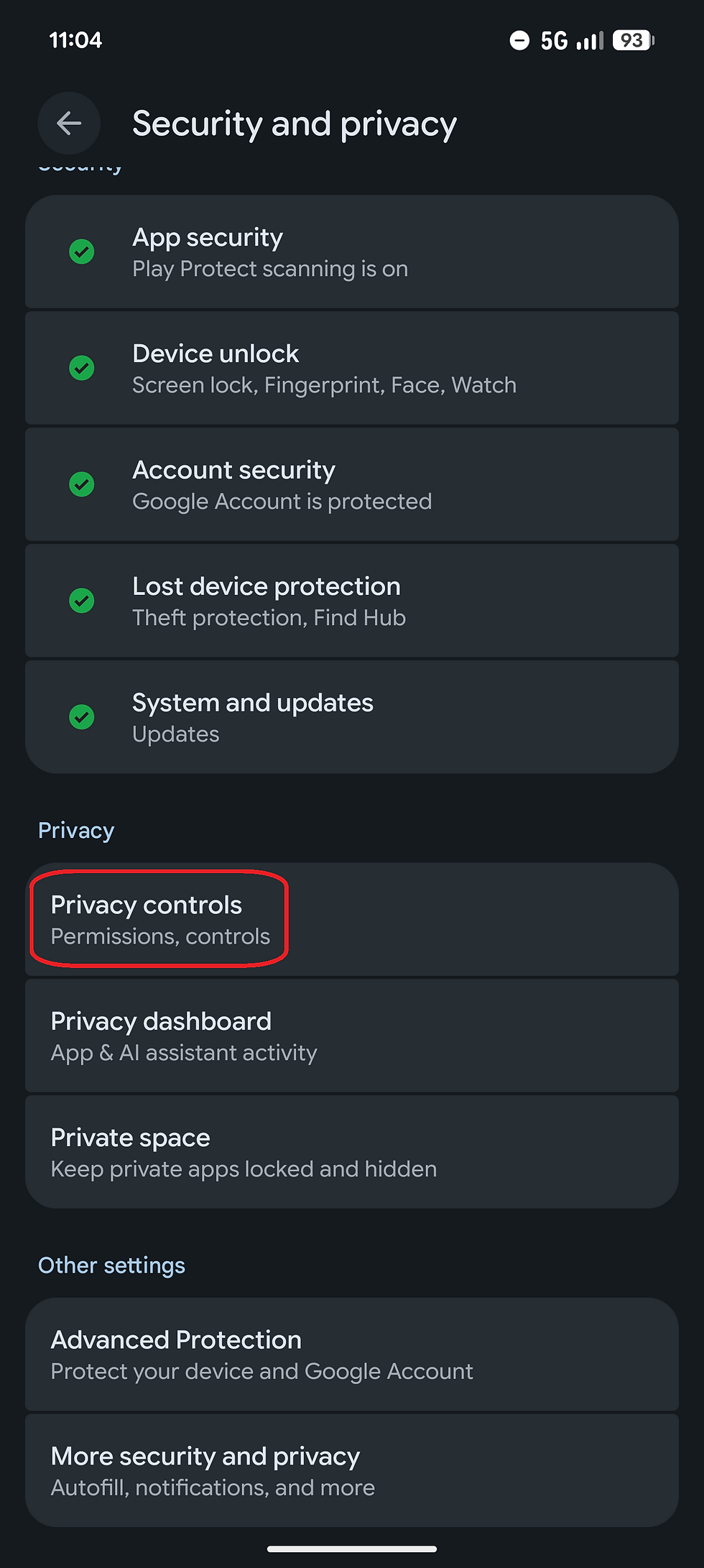
For Android devices you can check your permission settings by following this pathway in your Settings: Security & Privacy → Privacy Controls → Permission Manager → choose a permission.




Choose the least access you need:
Sometimes, you will have more than one choice when an app asks for permission.
For example, an app may ask to use your location. You may be able to choose “Allow Only While Using the App” instead of allowing the app to use your location all the time.
If the app only needs your location while you are using it, this can be a good choice. The app can use your location when you need the feature, but it cannot use your location when you are not using the app.
Not every permission will give you these choices. The options may also be different depending on your device and the app.
When you have a choice, try to give the app only the access it needs for the features you want to use.
Permission settings aren’t a permanent decision:
You don't have to make the perfect choice when an app first asks for permission. You can always change these settings later.
If an app needs permission to use a feature, it may ask you for permission when you try to use that feature again if you denied it access previously. So, if you are not sure about an app, you can choose not to give it access. If you decide to use that feature later, you can change the settings and give the app permission.
Not all permissions are created equally:
Some permissions give an app access to more sensitive information than others. For example, an app may ask to use your location, microphone, camera, contacts, or photos. These permissions can give the app access to sensitive information or certain parts of your device.
This does not mean these permissions are always unsafe or that you should always say no. Many apps have good reasons for needing them. Instead, think about what information or features you are giving the app access to and whether that access makes sense for what the app does.
A good rule to remember is: the more sensitive the information, the more carefully you should think about whether the app really needs it.
Here is a quick privacy checkup you can do right now to review your device’s permissions!
Take a few minutes to check the apps on your phone. Make sure they only have access to the information they need. You can review how to check these permissions in the How to check permissions on your mobile device section in this article.
Check app permissions: See which apps can use your location, camera, microphone, photos, and contacts.
Turn off permissions you do not need: If an app does not need a permission for the features you use, you can turn it off.
Remove apps you do not use: Delete apps you have not used in a while. There is no reason for an old or unused app to have access to your information.
Think before you tap “Allow”: When you install a new app, think about whether the permissions it asks for make sense for what the app does.
Doing a quick privacy check every few months can help you stay in control of the information your apps can access.
Comments